cani
cani is a tool for making permanent shareable + reusable checklists
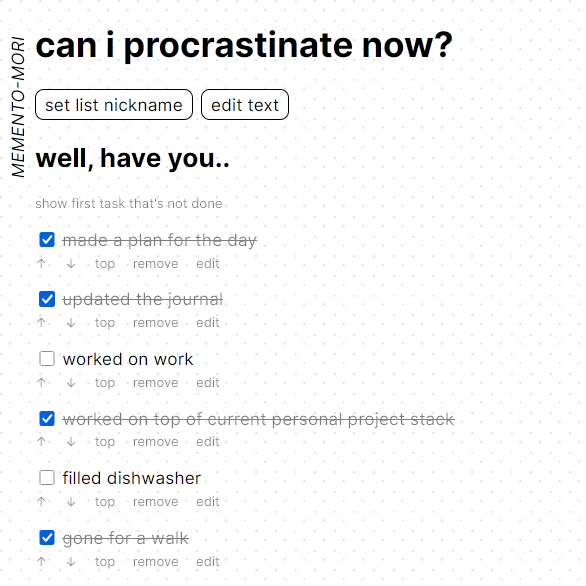
screenshot of https://cani.cblgh.org. the title reads ‘can i procrastinate now? with the subtitle ‘well, have you..’ followed by a list of tasks. the nickname of the list is memento-mori.
Checklists are stored on a server to enable viewing and editing from the different devices one might use in a day. At midnight, each checklist tick is cleared, making it ready for use once again while retaining the contents.
Use cases:
- Reminding oneself of daily chores and providing a little ‘boost’ when ticking one off (my initial use case!)
- Listing recurring tasks for shared spaces (hackerspaces, meetups, homes)
- Saving packing lists
- Recurring grocery lists (although paper is more convenient for this! :)
How it works
Each list has a randomly generated id, a UUIDv4, chosen to be unguessable. To minimize resource use, Brotli compression is applied before sending and storage.
Contents are encrypted client-side with the generated unique list id as password. This makes server-stored data unreadable. Stored data is referenced by the hash of the list id. Setting custom passwords is not implemented but has been considered; it may be implemented on request.
How it does not work
Or: things that are good to keep in mind
Each change overwrites the latest state. To see any changes made by others, reloading is necessary. These combined mean that use by multiple people at the same time for the same list can cause minor data loss (one person can overwrite another person’s latest change).
For a future batch of work I’d want to integrate websockets to better align with the liveness expectations users might have when many people are operating on the same list at the same time.
As I want to keep storage minimal, and as usual for my personal projects - manage system complexity to be as low as possible, implementing or using CRDTs has not been a topic of exploration for this specific project.
Why I made it
I initially made this so that I can check myself a bit easier each day and defer temptation attached to less fulfilling activities (news, scrolling) until after having done that which I regard more (items on the checklist). Since I use many different devices in a day (work computer, home computer, mobile computer) I made it in a way that lets me sync that state regardless of what computer I am using.
See also: a previous experiment with a social media computer.
As part of making this, I also wanted to exercise & gain some knowledge:
- use Vue v3 and touch a bit more of the composition syntax,
- try out parts of Golang relating to securely storing data,
- use Brotli for the first time,
- try out fetch for sending and receiving binary payloads + how to work with fetch-sent binary payloads on the server.
I think it would be fun to experiment with tweaks to the current functionality. Things like easily saving and retrieving the many different lists one’s made. I also want to try expanding the time-until-reset beyond the midnight reset to 1 week, 1 month, and even 3 months. If any of these are interesting to someone reading this, do reach out :)
Local git development
In local-git-remotes I write a bit about how I used a git remote hosted on another machine I have here at home to work on cani. It was originally a section in this post, but I decided it was worth its own page! :)
If you have never used a local remote, I recommend reading that page and trying it out! That same flow could be used in many different ways, such as collaborating with a friend over wifi.
End
This was made entirely by typing into vim from a few different computers and by reading docs. I worked on it from home, away visiting family, on a train, as well as made a big chunk at the monthly lowkey critical coding club.
p.s.
This pairs well with LeechBlock (usage advice).
I have set the url of LeechBlock’s blocking page to my personal cani list. My LeechBlock settings block a bunch of distracting domains for the majority of each weekday; I let a static 1 hour window open during evenings. When I navigate to one of those domains during a time when it is blocked, LeechBlock instead redirects me to my cani checklist and helps keep me on track with things I care more about doing than the temporary distraction.